
Table of Contents
Growth is great, but it also has a way of exposing every little crack in an old phone setup.
One new hire turns into three. A second location pops up. Remote work becomes normal. Suddenly, the “fine for now” phone system becomes the thing everyone complains about.
A scalable business phone system is not just “more lines.” It’s a setup for growing small businesses that can handle more people, more locations, and more call volume without turning every change into a mini project.
Below are the most practical ways to tell if a business phone system can actually grow with the company.
What a scalable business phone system looks like (in plain English)
A scalable phone system usually does these things well:
- It’s built for the cloud (so growth does not require new boxes and wiring).
- It’s easy to add and remove users.
- It works on mobile, desktop, and desk phones without weird workarounds.
- It supports more than one location without chaos.
- It gives clear reporting so problems show up before customers complain.
- It connects to tools already in use (like a CRM or Microsoft Teams).
That’s the baseline. Now here are the “proof points” to look for.
5 Ways to Know a Business Phone System is Scalable

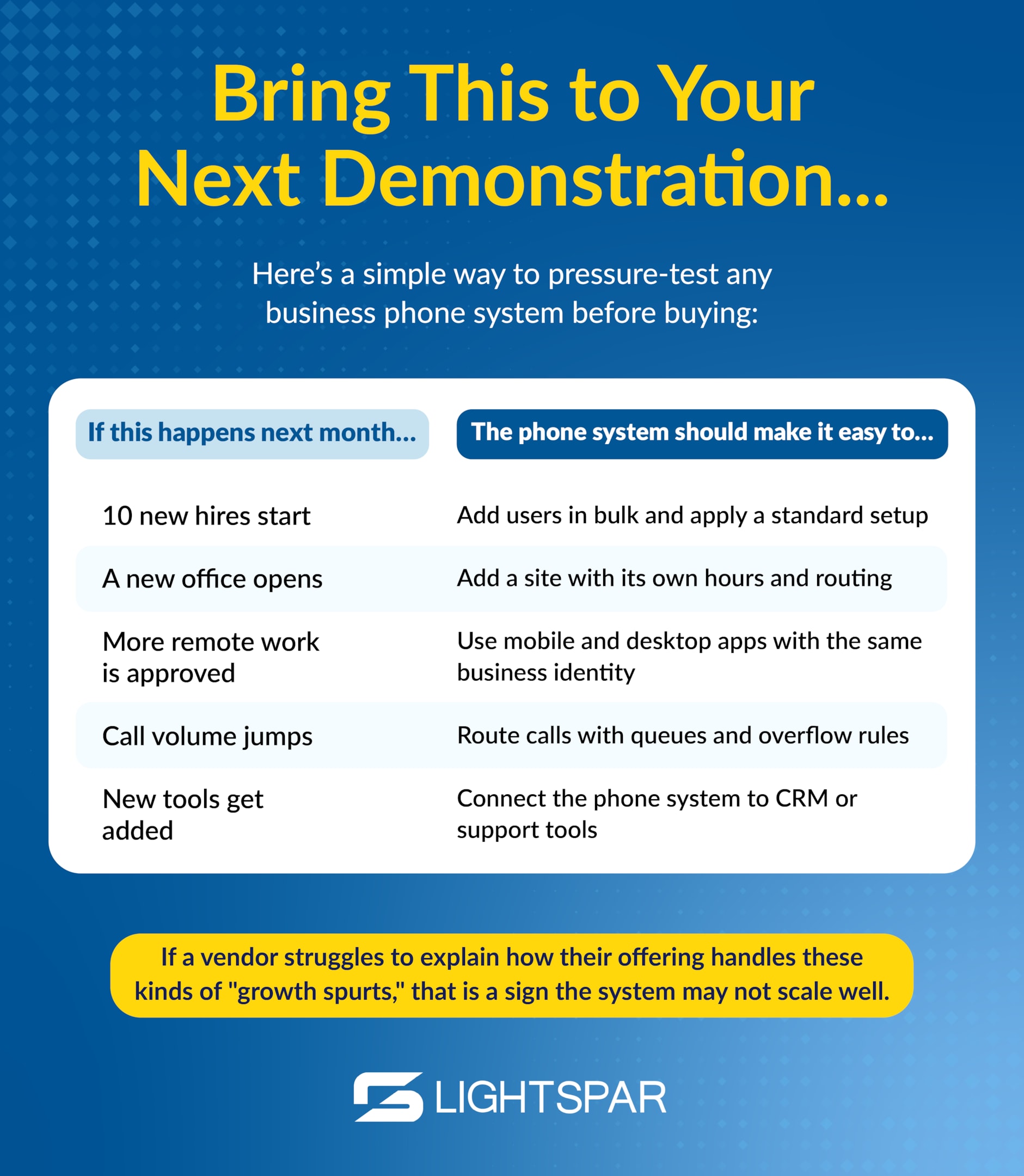
Here are five signs of a scalable phone system. Use them the next time you schedule a demonstration with a business phone system provider.
1) It’s truly cloud-based (not “cloud-ish”)
If scaling means buying more hardware, waiting on installs, or hoping a phone closet stays healthy forever, that’s not scalable. A true cloud business phone or hosted PBX system lets the company grow without dragging more equipment along for the ride.
What to look for:
- No required on-site PBX server, controller, or appliance in the proposal to add users or locations.
- A web admin portal where the provider can show (live) how to add a user, assign a phone number, and change call routing.
- Per-user pricing that stays consistent as headcount grows, instead of “hardware modules” and add-on cards.
- Updates included as part of the service, not separate upgrade projects.
Questions to ask potential VoIP phone system providers:
- “If we double headcount, what new hardware do we have to buy, if any?”
- “Where does the PBX live: in our building, your data centers, or both?”
- “How often do updates happen, and are they included?”
When the platform lives in the cloud, growth feels like a simple switch flip instead of a construction project.
For a quick refresher on why cloud calling is such a boon for growing teams, check out our blog on the subject.
2) Adding users is quick, simple, and consistent
Fast growth usually means fast hiring. If the process of setting up new users is slow or inconsistent, onboarding drags, and customers feel it.
What to look for:
- In a demo, a new user can be created start-to-finish in a couple of minutes (extension, voicemail, app access).
- Role-based templates exist (sales, support, front desk) so new hires get a consistent setup.
- Bulk adds are possible (CSV import or directory sync with Microsoft 365 or Google Workspace).
- Reassigning existing phone numbers or extensions is straightforward when someone changes roles or leaves.
Questions to ask potential VoIP providers:
- “Show me adding a user live. How many clicks is it?”
- “Can we add 20 users at once with templates and numbers?”
- “Which changes require support, and what can we do ourselves?”
If onboarding is easy, the phone system stays out of the way while the team ramps up.

3) Mobile business calling is built in, not treated like a workaround
As onsite and remote teams spread out, personal cell numbers and messy call handling can make a growing company look disorganized. A scalable business phone system like LightSpar’s supports mobile business calling so everyone stays reachable under the company identity.
What to look for:
- In a demo, a call placed from the mobile app shows the business number as caller ID.
- Remote users can have a real extension without needing a desk phone.
- Voicemail and call logs stay in one place across desktop and mobile.
- A live call can be moved from a desk phone to an app (and vice versa) without dropping.
- Point and click call forwarding in case someone can’t receive phone calls.
Questions to ask potential VoIP providers:
- “Can you show a call placed from the mobile app and what caller ID the customer sees?”
- “Can a remote worker have a full extension with no desk phone?”
- “How do voicemails and call logs work across mobile devices?”
When mobile is built in, the company can grow anywhere and still sound like one team.
4) Multi-site phone solutions plug in cleanly as locations grow
Multi-location growth fails when each office becomes its own island. Strong multi-site phone solutions make adding sites feel like adding a branch, not building a new business phone system.
What to look for:
- In the admin portal, locations can be created and labeled, with users and numbers assigned to each site.
- Each site can have its own hours and greeting, without breaking the main company number.
- All sites share one internal directory and short extension dialing.
- Incoming calls can overflow to another site or team if one location is closed or backed up.
Questions to ask potential business communications providers:
- “Show me how you set up a second location with different hours and a different greeting.”
- “If one location is closed, can calls automatically roll to another site?”
- “Can we keep one main number and route by caller choice or time of day?”
When locations plug in cleanly, expansion feels organized instead of duct-taped together.
5) It can handle more calls, shows what’s happening, and has a real reliability plan
More growth usually means more inbound calls and more pressure on teams. A scalable phone system helps calls get answered, shows what’s working, and has a plan for the days when life happens (outages, cutovers, emergencies).
What to look for in a VoIP phone system:
- Call queues, ring groups, and overflow rules so busy times do not turn into missed calls.
- Clear reporting from all communication channels on abandoned calls, hold time, and answer rates.
- Scheduled reports and call analytics for managers, plus a quick live view of who is available.
- Integrations with other business tools like a CRM, ticketing system, etc.
- A documented number porting and cutover process with a real human assigned to it.
- A way to manage E911 addresses per user and location, including remote staff.
Questions to ask potential VoIP providers:
- “What happens to inbound calls if the internet connection goes down at one location?”
- “Can you show a missed call report by hour and by department?”
- “Who owns the porting timeline, and what does cutover day look like?”
- “How do we update E911 addresses when someone moves or works from home?”
- “Which integrations are included vs. paid add-ons, and can you show one live in a demo?”
When call handling, reporting, reliability, and E911 are solid, growth comes with confidence instead of crossed fingers.
Make Growth Easy, Not Messy, with LightSpar’s Cloud-Based Phone System
At the end of the day, your business phone system should make growth feel simple, not stressful. Plus, if the phone system already feels tight, that’s your sign it won’t get easier as the company grows.
Want a straightforward gut-check on what scaling could look like for your team, plus a clean plan to get there? Reach out to LightSpar, and we’ll help you get started.